
Driver Error: Disable Windows Defender / Uninstall Anticheats #
When starting the spoofer, you may encounter the following red error notification:

Why this error occurs: Gen Spoof communicates with the kernel to randomize hardware serials. If Windows Defender's real-time protection is active, or if ring-0 anticheats such as Riot Vanguard or FACEIT Anti-Cheat are running, the driver communication is blocked.
Step 1: Disable Windows Defender with disable.exe #
Download and run the official disable utility to completely turn off Windows Defender:
DIRECT DOWNLOAD LINK
https://www.sordum.org/9480/defender-control-v2-1/- Download Defender Control v2.1 from the link above: Defender Control v2.1
- Open
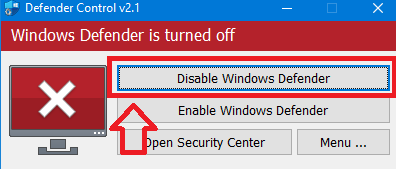
disable.exe(Defender Control). - Click the Disable Windows Defender button.
- The interface window will turn red with the status Windows Defender is turned off.
Step 2: Uninstall Conflicting Anticheats (Vanguard & FACEIT) #
Kernel-level anticheats like Riot Vanguard (Valorant) and FACEIT Anti-Cheat prevent third-party spoofing drivers from loading into memory. You must uninstall them before running Gen Spoof:
- Open Windows Settings (or press Win + I).
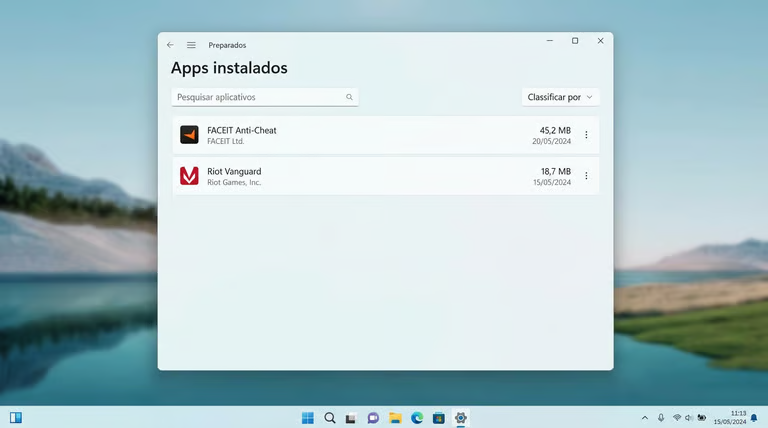
- Navigate to Apps > Installed apps.
- Locate FACEIT Anti-Cheat and Riot Vanguard in the list.
- Click the three dots (···) next to each and select Uninstall.
- Restart your PC to ensure their kernel drivers are completely unloaded.
Step 3: Launch Gen Spoof #
After completing the two steps above:
- Right-click Gen Spoof and select Run as administrator.
- The driver will now initialize cleanly without errors.
If you also get an error stating "A Drive cannot load on this device", make sure to disable Core Isolation / Memory Integrity as explained in the next guide.